Fields on the checkout
Add text, select, checkbox, date, phone, email and many more field types.

Add fields to the WooCommerce checkout without writing code, and validate national ID and tax numbers before the order is placed.
PRO ₺1.500 / year · 2 sites · The free version needs no licence.
Add text, select, checkbox, date, phone, email and many more field types.
TC Kimlik No and VKN are validated with their checksum algorithms.
For example, tax number, tax office and company name appear when "Corporate" is chosen.
Works with the classic (shortcode) and the block checkout; HPOS compatible.
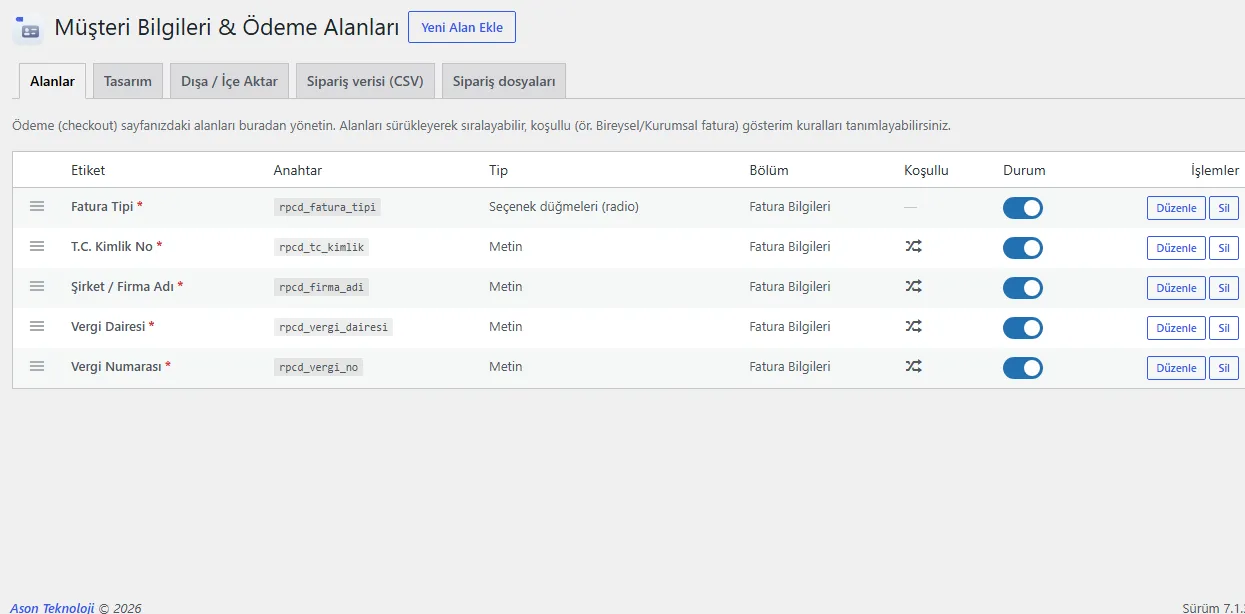
The plugin's real settings screen, in the Turkish interface.
What the free version does stays free. PRO is a separate add-on installed on top of the free plugin.
| Feature | FREEFree | PRO₺1.500 / year |
|---|---|---|
| In the free version | ||
| Fields in billing, shipping, order and account sections | ||
| Drag-and-drop order, required fields | ||
| Conditional visibility (individual / corporate) | ||
| Turkish national ID and tax number validation | ||
| E-mail, phone, URL and regular expression validation | ||
| Classic and block checkout, HPOS compatible | ||
| PRO only | ||
| Export / import of field settings | — | |
| Order data CSV (national ID, tax number, tax office) | — | |
| Conditions on payment, shipping, role and cart | — | |
| File attachments on orders | — | |
Download the plugin and install it from Plugins > Add New > Upload. The core works without a licence.
Buy it in the store; the licence key and the PRO add-on appear in your account.
Install the PRO add-on the same way and paste the key into Ason Teknoloji > Licence.
Yes. In the block checkout, showing and hiding runs in the browser; the server always validates.
With the order on your own site, like other WooCommerce order data.
Yes. PRO installs as a separate add-on on top of the free plugin; you keep the free plugin, and your settings and records stay in place.
The PRO features switch off. The free plugin keeps working and your data stays. When you renew, PRO picks up where it left off.
Each PRO licence activates on the number of sites shown on the product page. To move it, deactivate the licence on the old site.
No. The free plugin needs no licence key and contains no licensing, update or telemetry code.
A PRO licence is digital content delivered at the moment of purchase; under Turkish distance contract rules there is no right of withdrawal. You can try the free version before you buy.
Instant delivery · No right of withdrawal for digital content. When it expires, the PRO features switch off; the free plugin and your data stay in place.
One admin menu, one licence screen. Every plugin has a free and a PRO version.