Your own SMTP server
Every WordPress email, including contact forms, WooCommerce and password resets, goes through it.

Send WordPress e-mail through your own SMTP server; the password is stored encrypted and the send log never keeps message content.
PRO ₺3.500 / year · 2 sites · The free version needs no licence.
Every WordPress email, including contact forms, WooCommerce and password resets, goes through it.
Stored encrypted or set in wp-config.php; never shown, logged or sent anywhere.
When it fails, the reason (wrong password, server not reachable…) plus the original server message.
Date, recipient, subject, result and error; never the message content.
The plugin's real settings screen, in the Turkish interface.
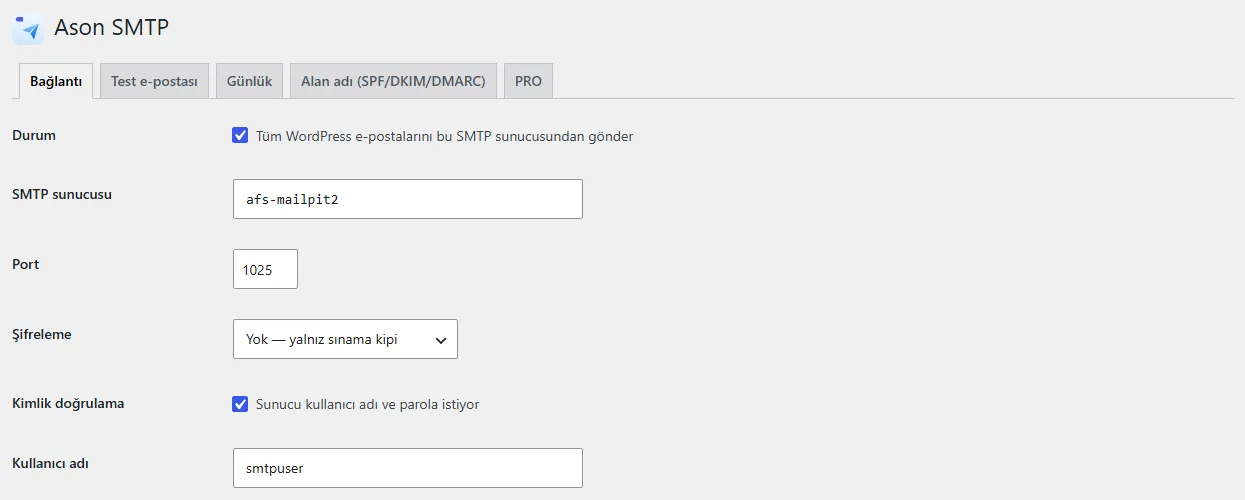
What the free version does stays free. PRO is a separate add-on installed on top of the free plugin.
| Feature | FREEFree | PRO₺3.500 / year |
|---|---|---|
| In the free version | ||
| Your own SMTP server (STARTTLS 587 or SSL/TLS 465), certificates always verified | ||
| Password stored encrypted or set in wp-config.php; never shown anywhere | ||
| Test e-mail with a clear reason when it fails | ||
| Send log (no content), kept up to 30 days | ||
| Admin warnings for another SMTP plugin or a failed e-mail | ||
| Sender address and name; SPF, DKIM and DMARC guidance | ||
| PRO only | ||
| Backup SMTP connection | — | |
| Rules per sender address | — | |
| Queue with retries at growing intervals (content waits encrypted) | — | |
| Longer log (up to 365 days) | — | |
| CSV export of the log | — | |
Download the plugin and install it from Plugins > Add New > Upload. The core works without a licence.
Buy it in the store; the licence key and the PRO add-on appear in your account.
Install the PRO add-on the same way and paste the key into Ason Teknoloji > Licence.
Yes. PRO installs as a separate add-on on top of the free plugin; you keep the free plugin, and your settings and records stay in place.
The PRO features switch off. The free plugin keeps working and your data stays. When you renew, PRO picks up where it left off.
Each PRO licence activates on the number of sites shown on the product page. To move it, deactivate the licence on the old site.
No. The free plugin needs no licence key and contains no licensing, update or telemetry code.
A PRO licence is digital content delivered at the moment of purchase; under Turkish distance contract rules there is no right of withdrawal. You can try the free version before you buy.
Instant delivery · No right of withdrawal for digital content. When it expires, the PRO features switch off; the free plugin and your data stay in place.
One admin menu, one licence screen. Every plugin has a free and a PRO version.