Points as a discount at checkout
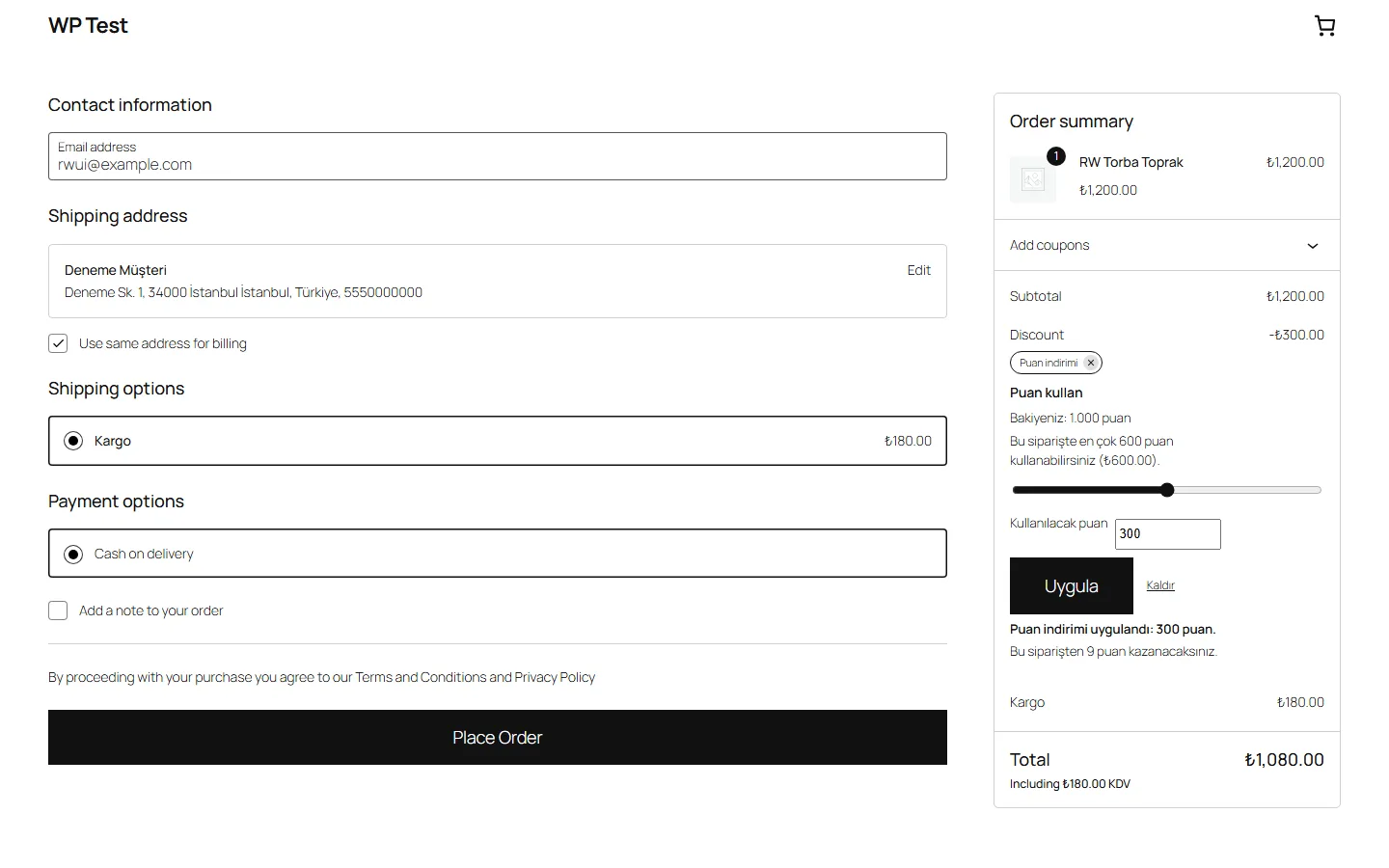
A "Use points" box in the block and classic checkout shows the balance and the maximum for the order; the discount is a "Points discount" line in the totals.

Loyalty points for WooCommerce: earn points on completed orders, spend them as a discount at checkout.
The free version needs no licence.
A "Use points" box in the block and classic checkout shows the balance and the maximum for the order; the discount is a "Points discount" line in the totals.
Points are deducted while the order is created, under a per-customer lock; two checkouts at the same time cannot use the same points.
Earned, used, taken back, returned, expired and manually adjusted points are rows linked to the order; the balance is calculated from the ledger.
Cancelled, failed and refunded orders take earned points back and return used points; partial refunds in proportion.
What visitors see on the site, and the plugin's settings screen; both are real screenshots.

What the free version does stays free. PRO is a separate add-on installed on top of the free plugin.
| Feature | FREEFree | PROComing soon |
|---|---|---|
| In the free version | ||
| Points on completed orders (default 1%; product amount with tax, without shipping) | ||
| "Use points" box in the block and classic checkout; the discount is a "Points discount" line in the order totals | ||
| Limits: at most 50% of the product amount after other coupons (adjustable), optional minimum | ||
| Every batch of points is valid for 12 months (adjustable, or no expiry) | ||
| Cancelled, failed and refunded orders take earned points back and return used points; partial refunds in proportion | ||
| Points are deducted while the order is created, under a per-customer lock: two checkouts cannot spend the same points twice | ||
| Points ledger linked to the order; the balance is always calculated from the ledger | ||
| My Account → My points; product pages and the cart show the points a purchase earns | ||
| Order e-mails show earned and used points (including Ason Store Manager e-mails) | ||
| Connects to no outside service; HPOS and Cart and Checkout blocks compatible | ||
| PRO only | ||
| Earning rate per category or product (including products that earn no points) | — | |
| Campaign multiplier: more points for orders between two dates | — | |
| Bonuses: sign-up, first completed order, birthday, approved product review by a verified buyer | — | |
| Reminder e-mail before points expire | — | |
| "Points" tab and report in the Ason Store Manager panel | — | |
| CSV export of the points ledger | — | |
Download the plugin and install it from Plugins > Add New > Upload. The core works without a licence.
Buy it in the store; the licence key and the PRO add-on appear in your account.
Install the PRO add-on the same way and paste the key into Ason Teknoloji > Licence.
Yes. PRO installs as a separate add-on on top of the free plugin; you keep the free plugin, and your settings and records stay in place.
The PRO features switch off. The free plugin keeps working and your data stays. When you renew, PRO picks up where it left off.
Each PRO licence activates on the number of sites shown on the product page. To move it, deactivate the licence on the old site.
No. The free plugin needs no licence key and contains no licensing, update or telemetry code.
A PRO licence is digital content delivered at the moment of purchase; under Turkish distance contract rules there is no right of withdrawal. You can try the free version before you buy.
Instant delivery · No right of withdrawal for digital content. When it expires, the PRO features switch off; the free plugin and your data stay in place.
One admin menu, one licence screen. Every plugin has a free and a PRO version.